Why this QR use case works
- Give visitors a direct link to your WhatsApp number.
- Offer a message draft for customers who prefer WhatsApp.
- Capture lead intent while attention is still high, with a prefilled message that identifies the source.
Step-by-step rollout
Step 1
Define one conversation objective
Choose booking, quote request, or product inquiry as the primary chat outcome.
Step 2
Prefill a useful starter message
Use a short draft naming the placement and request. The visitor can edit it; a draft does not establish lead quality.
Step 3
Align routing and response SLAs
Assign ownership so inbound WhatsApp chats are answered quickly by the appropriate team.
Step 4
Measure quality, not only volume
Track qualified outcomes such as booked calls or closed deals, not just message count.
Common mistakes to avoid
- Pointing the QR at a generic landing page instead of a wa.me chat opener.
- Launching without WhatsApp response coverage during business hours.
- Using generic prompts like 'Hi' that create unqualified chat traffic.
- Failing to track conversation outcomes by source placement.
Frequently asked questions
What is a WhatsApp QR code?
A WhatsApp QR code encodes a wa.me URL with a phone number and an optional prefilled message. The device decides how the link opens. The visitor reviews the draft and must send it before the business receives a message.
How do I build a wa.me QR code with a prefilled message?
Use the WhatsApp-to-PNG generator. Enter your business number in international format (e.g. +15551234567) and write the prefilled message in plain text. The generator URL-encodes the spaces and special characters, builds the wa.me URL, and produces a printable PNG QR code with no signup.
Can we use one WhatsApp QR code everywhere?
You can, but source-specific QR codes with different prefilled messages make WhatsApp lead attribution much more actionable. 'Hi, I scanned the Manchester showroom flyer' routes to a different team than 'Hi, I picked up your one-pager at SaaStr.'
Should the WhatsApp QR code open directly into chat?
Use a direct wa.me link when a conversation is the intended action. Provide a page first when visitors need prices, eligibility, or other information before contacting you. Compare actual inquiries rather than assuming either path converts better.
How do we improve WhatsApp lead quality from QR scans?
Use clear intent copy near the printed code (for example 'Scan to chat with sales'), structured prefilled WhatsApp messages that identify the source and request, and route based on prefilled keywords so the right team picks up the chat within the 24-hour customer service window.
Execution notes
A WhatsApp QR codeA 2D matrix barcode that encodes data in a square grid of black and white modulesA single black or white square in the QR grid. The number of modules per side scales with the QR versionThe size of a QR code, numbered 1 (21×21 modules) through 40 (177×177). Higher versions store more data but require more printed space. Read more →, from 21×21 modules for version 1 up to 177×177 for version 40. Read more →. Read more →, also called a wa.me QR code, stores a link to a WhatsApp number with an optional prefilled message. Scanning opens the link so a visitor can review and send the draft. It is useful when your customers already use WhatsApp and your team can respond. Opening the chat is not the same as sending a message, receiving a lead, or granting permission for future marketing.
Choose the messaging channel your customers actually use. Ask existing customers, check the messages you already receive, and compare completed inquiries from your own campaigns. National adoption figures do not establish which channel is best for your particular audience. Keep a phone or email contact option available for someone who does not use WhatsApp.
How to build a WhatsApp QR code with the generator
Use the WhatsApp-to-PNG generator to enter a number and an optional message. The file still needs testing on the intended phones and final print design; the generator does not certify it as scan-tested.
- Phone number in international format. Use the full country code with a leading plus sign — for example
+15551234567for the US,+44 7700 900123for the UK,+91 98XXXXXXXXfor India,+55 11 9XXXXXXXXfor Brazil. The generator strips the plus sign automatically when building thewa.meURL becausewa.meexpects the country code without it. - Prefilled message in plain text. Write a short request naming the sign or location. The generator uses URL encoding for spaces and punctuation, so enter normal text rather than manually adding escape sequences. Shorter messages can reduce QR density. The visitor can edit or abandon the draft before sending.
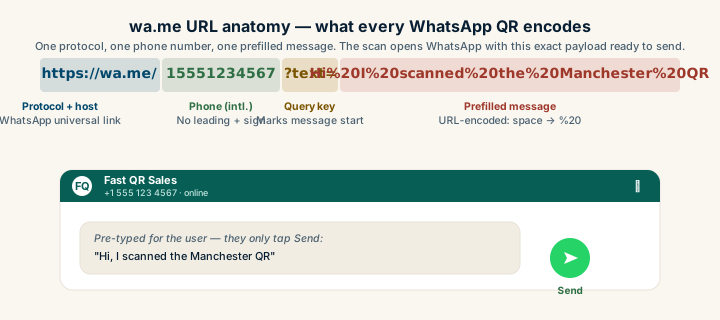
The output is a wa.me URL like https://wa.me/15551234567?text=Hi%20I%20scanned%20the%20Manchester%20showroom%20flyer%20and%20want%20a%20quote wrapped inside a QR code. Download as PNG for digital signage and small print, or step over to the WhatsApp-to-SVG generator for posters, vinyl decals, and anything larger than A4. The WhatsApp-to-JPG generator is available for legacy print workflows but PNG is the better default — it preserves sharper module edges.
If you want the same flow inline on this page, the main QR generator supports adding a logo, switching colors, and exporting at print-ready resolution without breaking the wa.me payload.
The wa.me URL and prefilled-message anatomy
The mechanism is a wa.me URL with the business’s phone number in international format and an optional prefilled message. The structure is https://wa.me/15551234567?text=Hi%20I%27d%20like%20a%20quote%20on%20the%20Cedar%20package. The URL spaces become %20 and apostrophes become %27 when the message is encoded. Most QR generators handle this encoding for you when given a plain-text message.
What goes inside the prefilled text matters more than the QR design. A bad prefill is “Hi” — it tells the agent nothing and forces a “How can I help you?” round-trip. A useful prefill identifies the source and the intent: “Hi, I scanned the QR at the Manchester showroom and want a quote on the brown leather sectional.” The agent now knows the location, the product, and the action without asking. Lead-routing rules can dispatch the chat to the Manchester sales team automatically based on the keyword.
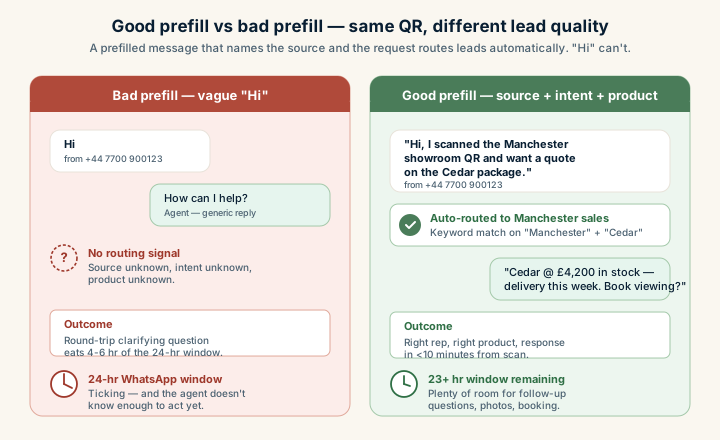
Three patterns work well across industries. A real-estate office might prefill “Hi, I saw the listing at [address] and want to schedule a viewing.” A B2B SaaS booth at a trade show might prefill “Hi, I picked up your one-pager at SaaStr and want to learn about [product].” A clinic might prefill “Hi, I’d like to book a [service] consultation.” Each carries source, intent, and a clear next-step request.
WhatsApp Business app vs WhatsApp Business API
Choose a business messaging setup from the features your team needs, rather than a universal chats-per-day threshold. Confirm who owns the number, who can reply, and how you will transfer responsibility when staff change. A QR simply opens the number; it does not provide an inbox, response automation, or access controls.
The WhatsApp Business app offers business tools for handling conversations. Check its current supported devices and features before designing a shared-team workflow. Set opening hours and a clear response expectation on the sign or linked page. Do not imply that every business profile is verified or that a QR makes a personal account suitable for a staffed support operation.
The WhatsApp Business Platform supports integrations for businesses that need a connected inbox or automation. Fees, provider features, and migration options vary. Read the current provider documentation and messaging policy before choosing a setup. A customer relationship management system can record messages, but the QR generator does not supply that integration.
If you change the messaging setup, test the existing printed number, message history access, staff permissions, and response workflow before switching. Do not assume that every migration transfers the same data or takes the same amount of time.
The 24-hour customer service window and template messages
For the WhatsApp Business Platform, the customer service window opens and resets when a user sends a message. Free-form replies are permitted within that 24-hour window; outside it, approved templates are required. This rule belongs to the Platform, not a universal description of every use of the Business app. Check the current WhatsApp Business Messaging Policy when configuring follow-up.
Templates have approval requirements, and approval is not guaranteed by a particular wording. Use the approved template appropriate to the message purpose. Do not claim that marketing messages are automatically rejected or that any follow-up is allowed merely because a customer once scanned a sign.
Scanning a QR or opening a prefilled chat does not open the customer service window. The visitor must send a message. Do not count an opened draft as an identified lead or treat it as marketing opt-in. Record the actual received message and follow the applicable permission and opt-out requirements for subsequent contact.
Combining QR with WhatsApp at high-intent moments
A prefilled chat can save a visitor from typing the initial request, while a web form can collect structured information. Choose based on the task. Test that the message identifies the right product or location, and that a staff member can act on it. A channel comparison should use completed inquiries or appointments, not QR scans alone.
There is no supported conversion multiplier for this guide. If you compare WhatsApp with a web form, keep the offer, placement, observation period, and definition of a qualified inquiry consistent. Report the sample sizes and actual messages received before deciding which channel to expand.
If visitors prefer another contact method, offer an SMS QR or phone QR with clear instructions. Test the intended devices: a prepared message or opened dialer is still an action the visitor must confirm.
CRM routing and lead-quality measurement
If your existing customer relationship management system supports a WhatsApp integration, test the received message, source label, staff assignment, and permitted data retention. Provider support changes, so confirm it from current documentation. Do not assume a scan automatically creates a contact record or that keywords route themselves without configured rules.
Without an integration, document who records qualified inquiries and who handles handoffs. A connected inbox may help a larger team, but there is no guaranteed payback period from a particular weekly chat volume. Keep the process proportionate to the work and protect access to conversation history.
Compare received messages, qualified inquiries, and completed bookings per placement. A busy sign may create more conversations without creating more sales. The scan tracking guide, business-card guide, and QR safety guide explain related links and destination checks. Keep a record of the measurement definitions so the next campaign can be compared fairly.
Sources


What we recommend for editable QR
WhatsApp campaigns change weekly — new offers, new landing pages, fresh A/B tests. t.ly redirects without re-printing flyers, and its scan reports can show activity by link. Track received messages and completed outcomes separately.
Rollout timeline
Days 1-14
Launch a constrained pilot in one high-intent placement.
Days 15-45
Fix low-performing surfaces and improve destination alignment.
Days 46-90
Scale to additional placements only after scan-to-action quality is stable.