
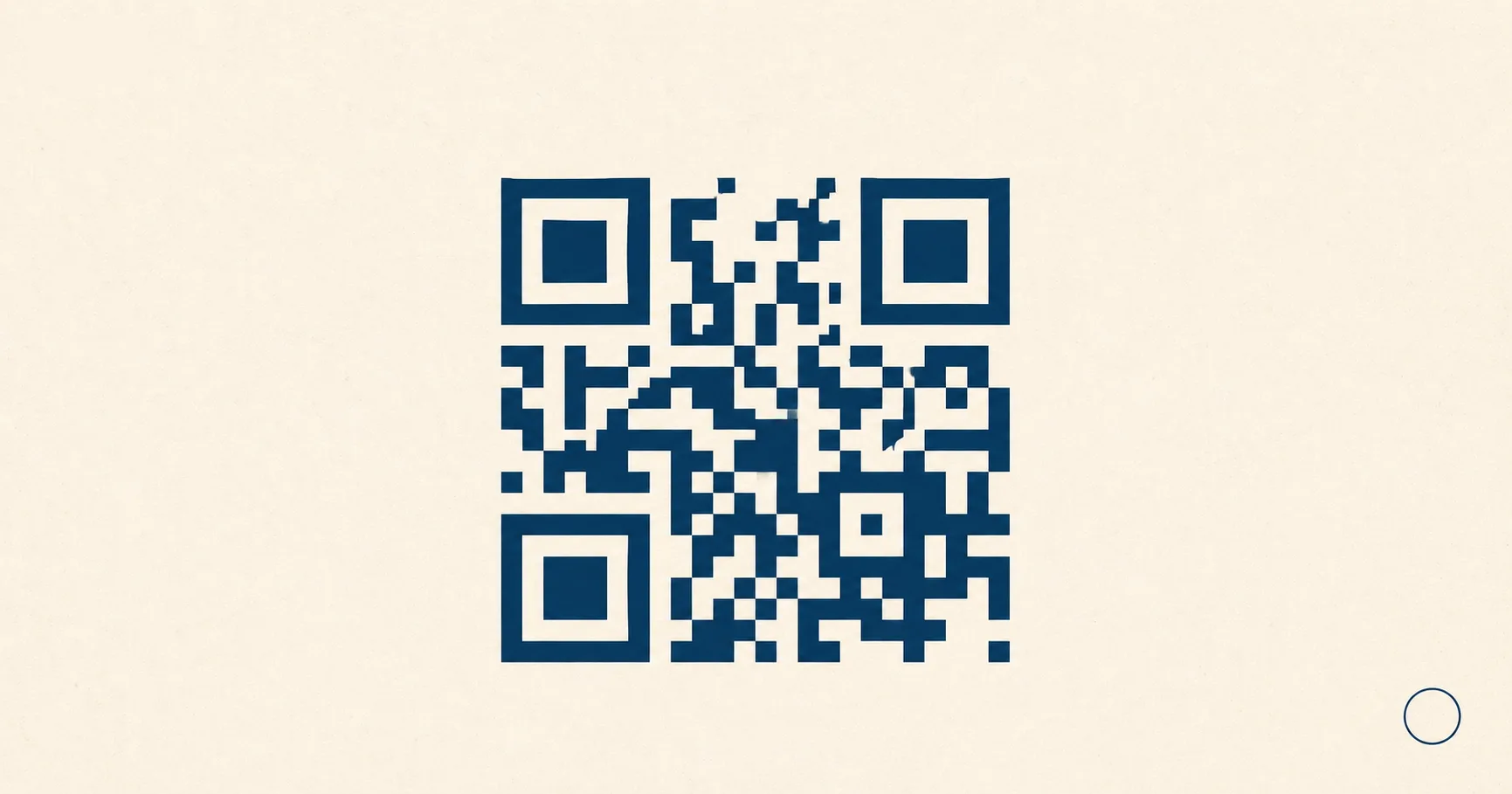
A QR codeA 2D matrix barcode that encodes data in a square grid of black and white modules. Read more → (short for Quick Response) is a two-dimensional barcode that stores data in a grid of dark and light squares called modulesA single black or white square in the QR grid. The number of modules per side scales with the QR versionThe size of a QR code, numbered 1 (21×21 modules) through 40 (177×177). Higher versions store more data but require more printed space. Read more →, from 21×21 modules for version 1 up to 177×177 for version 40. Read more →. Point a phone camera at one and the device decodes the pattern, then performs an action: opening a website, joining a Wi-Fi network, dialing a number, or drafting an email. The whole flow takes about a second when the code is well made.
QR codes spread because they solve a tedious problem cleanly. They scan from multiple angles, recover when part of the pattern is damaged, and require nothing more than the camera app already on every modern phone. You see them on menus, posters, packaging, business cards, event tickets, payment terminals, kiosks, and the back of shipping boxes.
This guide covers what a QR code actually is, what shapes inside it do what, and how to publish one that works the first time someone scans it.
Key takeaways
- A QR code is a two-dimensional barcode that stores data in a square grid of dark and light modules; a phone camera reads the pattern and decodes it in under a second.
- The three corner squares are finder patternsThe three large squares in the corners (top-left, top-right, bottom-left) of every QR code. Scanners use them to detect a QR in the camera frame, lock onto it, and determine its orientation. Read more → — they tell the scanner the code’s orientation. The blank margin around them is the quiet zoneThe unprinted margin of at least four modules' width that must surround every QR code. Read more →, at least 4 modules wide and mandatory for detection.
- QR codes are versioned 1–40; higher versions hold more data but make modules smaller. Keep payloads short to keep modules large.
- Reed–SolomonThe error-correction algorithm used in QR codes (and on CDs, DVDs, and deep-space probes). Read more → error correctionMathematical redundancy built into every QR code that lets it scan correctly even if part of the matrix is damaged, dirty, smudged, or covered (for example by a logo). Read more → lets a code keep working when up to 30% of its modules are damaged or covered by a logo.
- Static codes carry the destination URL directly; dynamic codes carry a redirect you can repoint without reprinting.
What a QR code can contain
In day-to-day use, a QR code usually encodes one of these payload types:
- A website URL. By far the most common. Sends the scanner to a landing page, menu, form, or product detail.
- Wi-Fi credentials. A specially formatted string with the network name, password, and encryption type. The phone joins automatically.
- A phone number. Triggers the dial app pre-filled with the number.
- An SMS template. Opens the messaging app with the recipient and body already filled in.
- An email draft. A
mailto:payload with the recipient, subject line, and body pre-populated. - Plain text. Less useful for business because the user still needs a follow-up step, but fine for short notes.
Here’s what each looks like as raw data inside the code:
https://fast-qr.app/qr-code-forWIFI:T:WPA;S:MyGuestNetwork;P:correct-horse-battery-staple;H:false;;tel:+14155552671sms:+14155552671?body=Hi%20I%20want%20to%20book%20a%20table%20for%202mailto:support@example.com?subject=Order%20help&body=My%20order%20number%20is%20...If you need a code right now, the URL-to-PNG generator downloads a print-ready file in seconds. For design work that scales without blurring, use the SVG version. Sharing a guest network? Generate one with the Wi-Fi-to-PNG generator and skip the awkward password dictation. For visual reference of every common payload type and what it encodes — from Wi-Fi to vCardA standard text format for contact information (name, email, phone, address, organization) defined by RFC 6350. Read more → to WhatsApp — see QR code examples.
QR code anatomy — the labelled parts of a QR symbol
A QR code is not random squares. The anatomy of a QR symbol is fixed by the spec so a scanner can find it, square it up, and decode it in one camera frame. Once you know what each part does, design choices that break scanning become obvious.
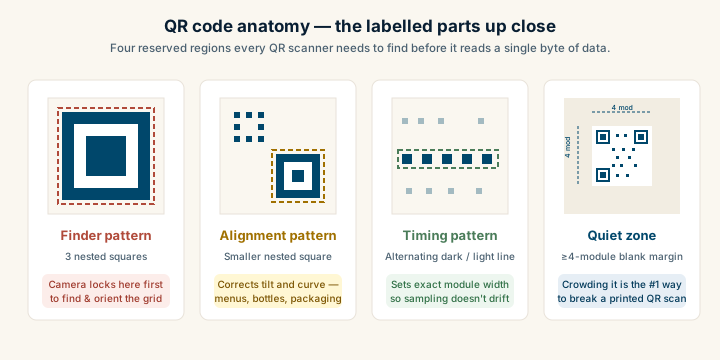
The labelled regions in every QR code, big or small:
- Finder patterns — the three large nested squares in the corners. The scanner uses them to locate the code and figure out its orientation.
- Alignment patternSmaller square patterns scattered through QR codes from version 2 onward. They help scanners correct for perspective distortion when the code is photographed at an angle, on curved surfaces, or with a wide-angle lens. Read more →(s) — smaller nested squares near the opposite corner. They correct for perspective tilt and curved surfaces.
- Timing patternsA row and column of alternating black/white modules running between the finder patterns. Scanners use them to determine the exact size of each module after rough detection, locking the read into the QR's grid. Read more → — the alternating dark/light lines running between finders. They tell the scanner the exact module width.
- Quiet zone — the blank margin (≥4 modules) around the code. It separates the code from surrounding artwork so the scanner does not get confused.
- Format and version info — a thin strip around the finders that encodes the error correction level and the QR version number.
- Data + error correction modules — everything else: your payload bytes plus the Reed–Solomon parity that lets the code survive damage.
Finder patterns
The three large nested squares in three corners are finder patterns. They do most of the heavy lifting before any data gets read. A camera looking at a busy scene uses them to:
- Detect that something in the frame is a QR code at all.
- Establish the code’s orientation, even if it’s rotated 90, 180, or 270 degrees.
- Estimate the module grid spacing so the scanner knows where each cell sits.
Three corners (not four) is intentional. The asymmetry tells the decoder which way is up.
Alignment patterns
Larger QR codes include one or more smaller nested squares, typically near the bottom-right. These alignment patterns help the scanner correct for:
- Perspective distortion when the code is viewed at an angle, like a menu on a tilted table.
- Curved or warped surfaces such as bottles, takeaway cups, or flexible packaging.
- Print variation from low-resolution printers or ink bleed.
The smallest QR codes (Version 1) skip alignment patterns because the grid is small enough not to need them.
Timing patterns
Between the finder patterns run thin lines of alternating dark and light modules. These timing patterns let the scanner measure exactly how wide one module is in the captured image, so it samples each cell at the right pixel coordinates. Without timing patterns, sampling drift would compound across a large grid.
The quiet zone
A QR code needs blank padding around it called the quiet zone. This is not visual breathing room. It’s a functional requirement.
The quiet zone keeps the scanner from confusing nearby text, borders, or graphics as part of the pattern. Specs call for at least four modules of blank space on every side. Crowding the margin is the single most common reason printed codes fail in the real world. If a QR code sits inside a colored frame or wedged against body copy with no padding, expect customer complaints. See the glossary entry for quiet zone for the exact measurements.
Data and error correction modules
Everything else in the grid carries either your payload or redundancy data. Reed-Solomon error correction lets the code decode even if part of it is missing or covered. That’s how a small logo in the center can sit on top of data modules without breaking the scan, and how a scuffed corner on a sticker still works.
For more on how that recovery actually works, see QR code error correction explained.
QR versions and why size matters
QR codes come in versions numbered 1 through 40. Each step up adds modules to the grid, raising capacity but shrinking individual modules at any fixed printed size. A Version 1 code is 21x21 modules. A Version 40 code is 177x177.
Higher capacity sounds appealing until you remember that smaller modules at the same physical size are harder for cameras to resolve under poor lighting, motion blur, or long scan distance. A poster QR with thousands of tiny modules might look fine on your monitor and fail on the wall.
The reliable move: keep your payload short so the encoder picks a low version. A clean 30-character URL fits comfortably at Version 2 or 3. A 200-character URL with tracking parameters can push you to Version 7 or higher and noticeably tighten the grid. If the URL is bloated with query strings, shorten the destination or route through a redirect.
For sizing rules by use case, see the size and print guidelines.
Static vs dynamic codes
Most QR codes you generate are static. The destination is encoded directly into the pattern, so once printed, that pattern always points to the same place. Cheap, private, and they last forever, but if the destination URL changes, every printed code becomes useless.
Dynamic QR codesA QR code that points to a short redirect URL controlled by a service. Read more → encode a redirect URL that you (or a vendor) own. The redirect can be repointed anytime without touching the printed code. Useful for long-running campaigns, but it adds an operational dependency: if the redirect domain lapses or the vendor’s service shuts down, every code breaks. Vendor short links are especially risky for materials with a multi-year life.
For a deeper comparison, including when each makes sense, see static vs dynamic QR codes.
Before you print
A few sanity checks save expensive reprints later.
Lock the destination. Temporary campaign pages disappear; if the URL changes after print, every code is dead. If flexibility matters, route through a redirect on a domain you control.
Pick high contrast. Dark modules on a light background scan faster than the reverse, especially in the dim restaurant or warehouse lighting where most QR codes actually get scanned. Avoid pale gray on white, no matter how stylish it looks in the mockup.
Preserve the quiet zone. Leave at least four modules of blank space on every side. If your design crowds the code, redesign the layout, not the code.
Test on multiple devices. Try iPhone, Android, and at least one older phone. Scan from a typical user distance, not from six inches away.
Match the file format to the medium. Use SVG when the code lives in design software or scales for large-format print. Use PNG for digital displays, slide decks, and email. The URL-to-SVG generator and URL-to-PNG generator cover both.
For full rollout playbooks by scenario, see the use-case guides: guest Wi-Fi, restaurant menus, retail packaging, and customer reviews are good starting points.
To choose between label formats, read the QR code versus barcode comparison. For the mechanism behind the pattern, see how QR codes work, and for practical reasons to use one, see QR code benefits.
Sources
- Wikipedia — QR code — Comprehensive technical overview, history, and global adoption notes.
- Denso Wave — About QR Code — Primary documentation from the inventor of the QR code.
- ISO/IEC 18004:2015 — The international standard that formally defines the QR format and decoder behavior.