
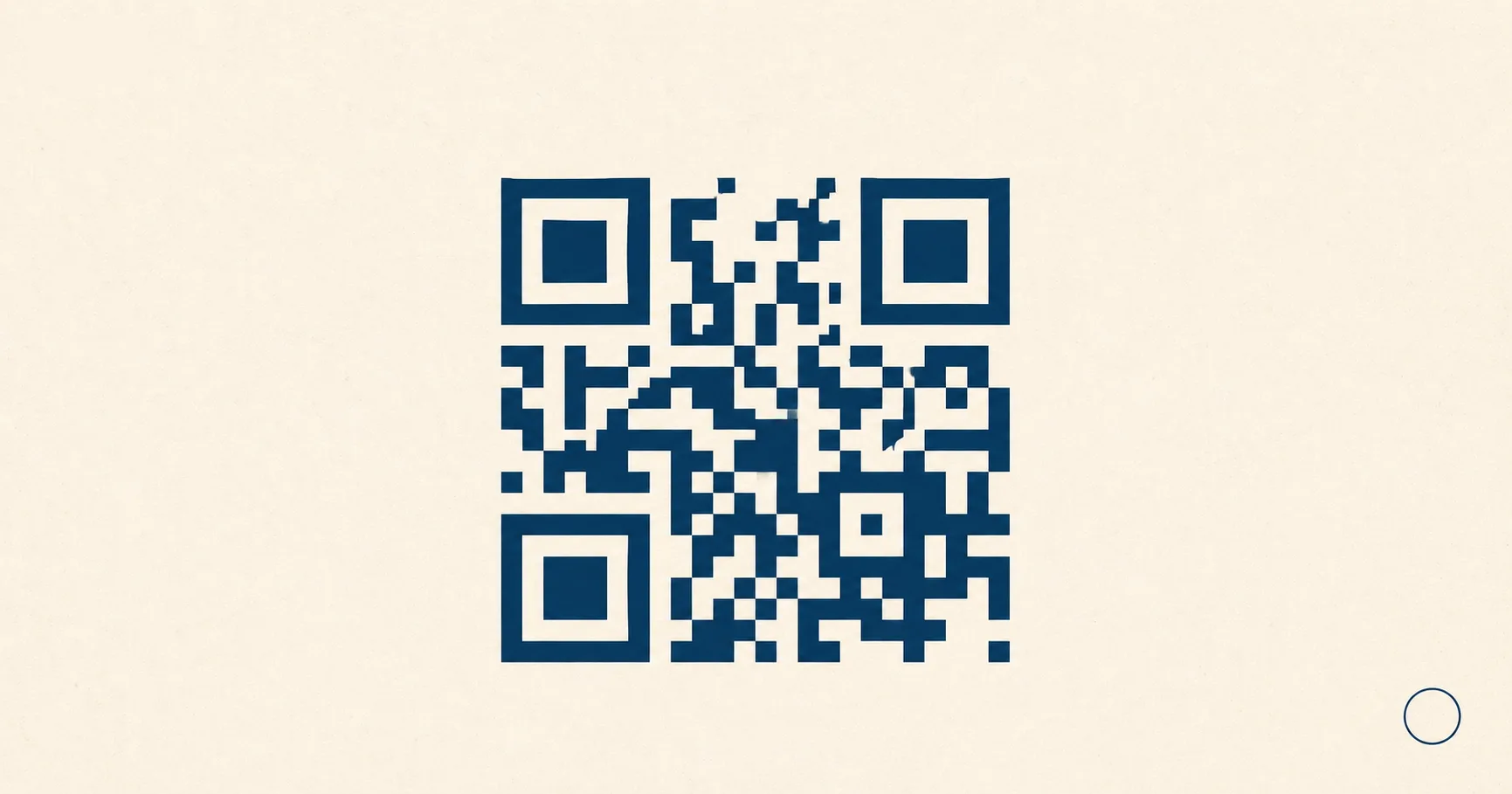
QR codesA 2D matrix barcode that encodes data in a square grid of black and white modules. Read more → are everywhere on menus, receipts, packaging, and posters, but most people have never seen what the inside of one actually looks like. The pattern is the visible part. The payload — the string of characters the camera decodes — is the part that decides what happens after the scan. A URL opens a browser. A Wi-Fi string joins a network. A tel: link opens the dialer. The visual is the same square grid of dark and light modulesA single black or white square in the QR grid. The number of modules per side scales with the QR versionThe size of a QR code, numbered 1 (21×21 modules) through 40 (177×177). Higher versions store more data but require more printed space. Read more →, from 21×21 modules for version 1 up to 177×177 for version 40. Read more → either way.
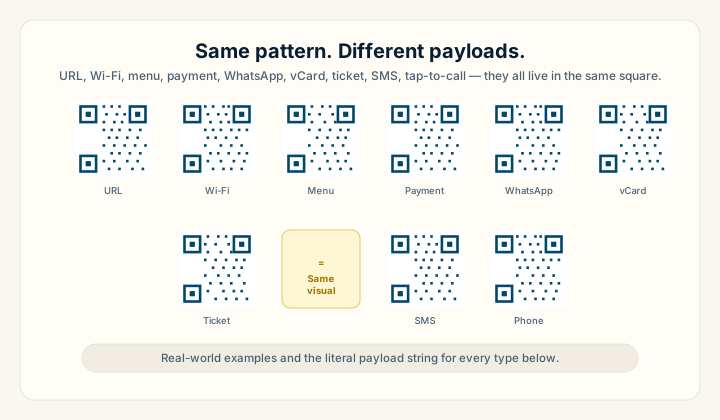
This guide collects real, working examples of every common QR code type. Each example shows what the code looks like, the literal encoded payload, the generator route on Fast QR that creates one, and the practical notes that decide whether to ship PNG or SVG, where to place it, and what failure modes to watch for. If you have ever wondered “what does a QR code look like” or “what information is inside a QR code,” this is the visual reference.
Key takeaways
- A QR code is a square grid plus three corner squares. The three large nested squares are finder patternsThe three large squares in the corners (top-left, top-right, bottom-left) of every QR code. Scanners use them to detect a QR in the camera frame, lock onto it, and determine its orientation. Read more → that orient the scanner; everything else carries data and Reed-Solomon parity. The visual is independent of the payload — a URL QR and a Wi-Fi QR look identical to the eye.
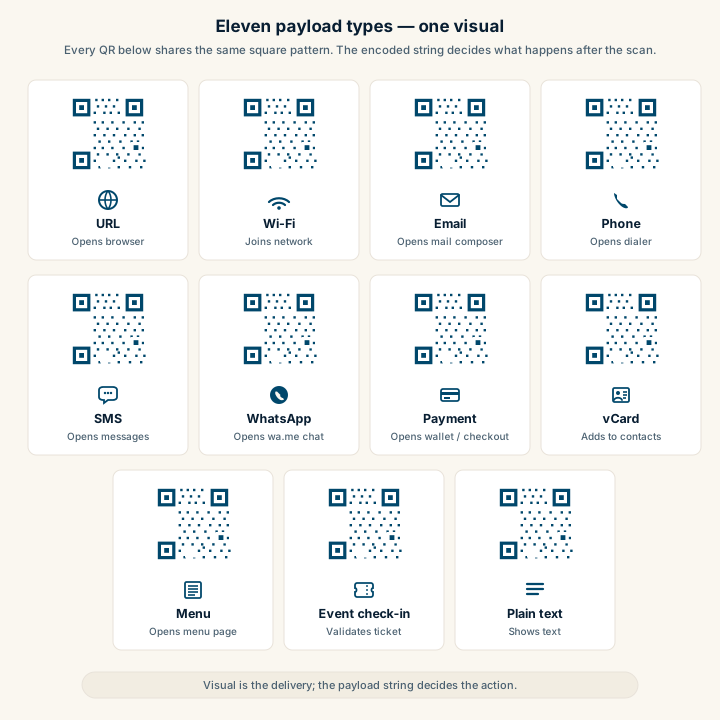
- Eleven payload types cover almost every business use case. URL, Wi-Fi, email, phone, SMS, WhatsApp, payment link, vCardA standard text format for contact information (name, email, phone, address, organization) defined by RFC 6350. Read more → business card, restaurant menu, event check-in, and plain text are the patterns you will actually encounter.
- Two codes can look different and decode to the same data. Eight masking patterns, four error correctionMathematical redundancy built into every QR code that lets it scan correctly even if part of the matrix is damaged, dirty, smudged, or covered (for example by a logo). Read more → levels, color choices, module shapes, and embedded logos all change appearance without changing the payload.
- PNG is fine for digital and small print; SVG scales to billboards. The decision is about output medium, not about the QR data inside.
What every QR code has in common
Before the type-by-type examples, here is the structural template every QR code follows. Once you can spot these regions in any code, the differences between use cases become obvious.
For a deeper walkthrough of why each region exists, see what is a QR code for the anatomy diagram and how QR codes work for the decode pipeline. The payload examples below assume the basic structure and focus on what is encoded.
URL QR code example
The most common payload by a wide margin. Around 80% of QR codes in business use carry a plain HTTPS URL. Posters, packaging, business cards, restaurant menus, and product labels almost always fall back to URL once you trace what is actually encoded.
What you see: a regular black-on-white QR code, usually 2-5 cm on print, sometimes with a small centered logo.
What it encodes:
https://example.com/sale?utm_source=poster&utm_medium=qr&utm_campaign=springGenerator route: /static/url-to-png for a PNG suitable for digital and small print, or /static/url-to-svg for scalable print files. Both pages handle the encoding and let you embed a logo without breaking scans.
PNG vs SVG: ship PNG for slide decks, social posts, in-app images, and small flyers up to A5. Ship SVG for posters larger than A5, signage, banners, or anything heading to a designer’s InDesign file. SVG also keeps the file size tiny when you scale up.
Operational notes:
- Always use HTTPS. Modern phones flag plain HTTP and some browsers warn the user.
- Keep query strings short — long URLs force the encoder to a higher QR version with smaller modules, which scan less reliably.
- If you may want to repoint the destination later without reprinting, route through a short URL or branded redirect domain you control. The static vs dynamic QR codes comparison covers the trade-off.
Wi-Fi QR code example
A Wi-Fi QR joins the device to a network without anyone typing the password. iOS 11+ and Android 10+ recognize the format natively and prompt the user with a “Join Network?” sheet.
What you see: identical visual to a URL QR. There is no way to tell from the pattern alone that this is a Wi-Fi code.
What it encodes:
WIFI:T:WPA;S:GuestNetwork;P:correct-horse-battery-staple;H:false;;The structured fields are:
T— encryption type:WPA(covers WPA2/WPA3),WEP, ornopassfor open networks.S— SSID, the network name.P— the password (omit fornopassnetworks).H—trueif the network is hidden,falsefor broadcast SSIDs.
Special characters in the SSID or password (semicolons, colons, commas, backslashes, quotes) need escaping with a backslash. The Wi-Fi-to-PNG generator handles the encoding and escaping automatically.
PNG vs SVG: PNG for table tents, lobby signs, and laminated cards. SVG for window decals, large counter signs, and anything printed bigger than A4.
Operational notes:
- Always use a guest network, never your operational network. A printed Wi-Fi QR is publicly readable by definition.
- Avoid open (
nopass) networks — modern phones warn users about “unsecured network” and scare non-technical guests off. - Verify the SSID and password character-for-character before printing. A wrong character means every scan fails silently. See Wi-Fi QR code best practices for the full security and operational checklist.
Email QR code example
A mailto: QR pre-fills the recipient, subject line, and body in the device’s default mail app. Useful for “request a quote” or “report an issue” prompts on flyers, support stickers, and trade-show one-pagers.
What it encodes:
mailto:sales@example.com?subject=Quote%20request&body=Hi%20team%2C%20I%20saw%20your%20booth%20at%20SaaStr%20and%20would%20like%20pricing%20for...The subject and body are URL-encoded — spaces become %20, commas become %2C, newlines become %0A. The email-to-PNG generator handles the encoding and gives you separate fields for recipient, subject, and body.
Operational notes:
- Pre-fill the source in the subject (“Quote request — Manchester showroom flyer”) so inbound triage knows which placement worked.
- Keep the body short — a 2,000-character pre-fill works on most phones but breaks some Android mail clients.
- For higher-intent inbound, an SMS QR or WhatsApp QR usually outperforms email because reply latency is lower.
Phone tap-to-call QR code example
A tel: QR opens the device dialer with the number pre-filled. The user taps once to call. Useful for service-business signage, emergency contacts, and restaurant reservation cards.
What it encodes:
tel:+14155552671Always use full international format with the country code and a leading plus sign — +1 for US/Canada, +44 for UK, +91 for India, +55 for Brazil. The phone-to-PNG generator handles formatting.
Operational notes:
- The leading plus sign matters.
tel:14155552671works for some Android devices but iPhones may refuse to dial. - For businesses with multiple regional numbers, print per-region codes. Routing one number across regions adds latency and call-quality issues.
- Pair the QR with the phone number printed in human-readable form. Some users prefer typing, some prefer the scan, and you want to capture both.
SMS QR code example
An sms: QR opens the messaging app with the recipient and body pre-filled. The user taps Send to deliver. Common for lead capture, support shortcut prompts, and one-tap event confirmations.
What it encodes:
sms:+14155552671?body=Hi%20I%20saw%20the%20flyer%20at%20the%20Manchester%20showroom%20and%20want%20a%20quote%20on%20the%20Cedar%20packageThe body is URL-encoded the same way as email. The SMS-to-PNG generator handles encoding and lets you preview the message before generating the code.
Operational notes:
- For US contexts, SMS usually beats WhatsApp because adoption is mixed. For Latin America, India, the EU, and most of the rest of the world, WhatsApp wins.
- Identify the source in the prefill so your CRM can route the lead to the right team automatically.
WhatsApp lead QR code example
A wa.me QR opens WhatsApp pre-filled with a message and the business number ready. WhatsApp lead QRs are the highest-intent inbound channel for any market where WhatsApp is the dominant messaging app — India, Brazil, Mexico, Spain, Argentina, Germany, Indonesia, and dozens more.
What it encodes:
https://wa.me/15551234567?text=Hi%20I%20saw%20the%20flyer%20at%20the%20Manchester%20showroom%20and%20want%20a%20quote%20on%20the%20Cedar%20packageSpaces become %20, apostrophes become %27. The WhatsApp-to-PNG generator handles the encoding and lets you set the phone number and the prefill text separately.
Operational notes:
- Identify the source and intent in the prefill. “Hi” tells the agent nothing; “Hi, I scanned the QR at the Manchester showroom and want a quote on the Cedar package” tells the agent the placement, the product, and the action.
- For deeper deployment notes — including the WhatsApp Business app vs API decision, the 24-hour customer service window, and regional tone — see the WhatsApp leads playbook.
Payment link QR code example
A payment QR can carry one of several payload formats. The simplest is a regular HTTPS URL pointing at a hosted checkout page. Country-specific standards (EMVCo QR in Brazil’s PIX, India’s UPI, Singapore’s PayNow, Hong Kong’s FPS) carry merchant-coded payloads that the local payment app recognizes natively.
What it encodes (URL fallback):
https://checkout.example.com/inv/2026-05-26-ACME-7281What it encodes (UPI example, India):
upi://pay?pa=merchant@bank&pn=ACME%20Coffee&am=4.50&cu=INR&tn=Invoice%202026-05-26-7281The fields in a UPI payload are: pa payee address, pn payee name, am amount, cu currency, tn transaction note.
Operational notes:
- For multi-region deployments, the URL approach is the safest default. The hosted checkout page detects the user’s location and currency and falls back to a card form if no local wallet is available.
- Trust matters more for payment QRs than any other type. The landing page must clearly display the business name and the actual domain so the user can verify before tapping through. See the payment links playbook for branded checkout patterns.
- QR phishing — fake QR stickers placed over legitimate ones on parking meters, restaurant tables, and EV chargers — is documented and growing. Print the receiving wallet name or domain near the code so customers can verify visually before scanning.
Business card (vCard) QR code example
A vCard QR encodes a contact in the standard vCard 3.0 format. Scanning prompts the phone to add the contact to the address book in one step.
What it encodes:
BEGIN:VCARD
VERSION:3.0
N:Haider;Rehan;;;
FN:Rehan Haider
ORG:Fast QR
TITLE:Founder
TEL;TYPE=CELL:+14155552671
EMAIL:rehan@example.com
URL:https://fast-qr.app
ADR;TYPE=WORK:;;123 Market St;San Francisco;CA;94103;USA
END:VCARD
The fields use the RFC 6350 vCard specification. Some older Android phones prefer vCard 2.1 over 3.0; if you need cross-version compatibility, encode the minimum set (FN, TEL, EMAIL, URL) and skip the structured address.
Operational notes:
- vCard payloads are long. A full card with address, multiple phone numbers, and a photo can push the QR version high enough that modules become hard to scan at business-card print sizes (2-2.5 cm).
- A shorter alternative: encode a URL to a hosted contact page (
https://example.com/me/rehan). The hosted page can offer “Save to contacts” as a download, while the QR stays low-density and scans reliably. See the business cards playbook for the vCard vs URL trade-off.
Restaurant menu QR code example
The QR on a restaurant table tent almost always encodes a URL to a mobile-optimized HTML menu page. PDFs scale badly on phones and create pinch-to-zoom friction; restaurants that link to PDFs see lower engagement and more “can I get a paper menu?” requests.
What it encodes:
https://restaurant.example.com/menu?location=manchesterOperational notes:
- Link to a mobile-first HTML page, never a PDF. The full reasoning is in menu QR vs PDF menu and the deployment-side detail is in the restaurant menu playbook.
- Route through a stable URL you control. Switching menu platforms a year later should not require reprinting 200 table tents.
- Pair the menu QR with a Wi-Fi QR on the same table tent. Dim dining rooms have unreliable cellular, and the most common cause of menu QR failure is a slow page load on weak signal.
Event check-in QR code example
Event check-in QRs encode a unique ticket identifier that the door staff’s scanner validates against the attendee list. The visual is generic; the payload is what matters.
What it encodes:
https://event.example.com/checkin/EV2026-ATT-8472-T-9F3KThe trailing path segment is the ticket ID. Some systems sign the ID with HMAC so the QR cannot be forged.
Operational notes:
- Print the ticket ID as a backup string next to the QR. When the door scanner inevitably has a hardware issue, manual lookup needs a typeable fallback.
- Generate codes with error correction level Q or H — tickets get folded, crumpled, and pulled out of pockets in low light, and the extra parity buys reliability.
- The event check-in playbook covers queue management, offline fallback, and badge-vs-ticket placement.
Plain text QR code example
Plain text payloads are uncommon in business use because the user still has to act on the message manually — there is no protocol prefix to trigger an OS action. They show up occasionally on internal operations signage, back-of-house notes, or simple memorial plaques.
What it encodes:
Wi-Fi password: ask staff for the daily code (do not post passwords in public areas)For public-facing use cases, a URL or tel: payload almost always beats plain text. The exception is short, copy-paste-friendly content like a serial number, a coupon code, or a part number.
Common payload types at a glance
| Payload | Visual | Prefix or format | Action on scan | Generator |
|---|---|---|---|---|
| URL | Square grid | https://... | Opens browser | URL → PNG, URL → SVG |
| Wi-Fi | Square grid | WIFI:T:...;S:...;P:...;H:...;; | Joins network | Wi-Fi → PNG |
| Square grid | mailto:...?subject=...&body=... | Opens mail composer | Email → PNG | |
| Phone | Square grid | tel:+... | Opens dialer | Phone → PNG |
| SMS | Square grid | sms:+...?body=... | Opens messages | SMS → PNG |
| Square grid | https://wa.me/...?text=... | Opens WhatsApp chat | WhatsApp → PNG | |
| Payment | Square grid | URL or EMVCo merchant string | Opens wallet or checkout | URL → PNG (URL fallback) |
| vCard | Square grid (denser) | BEGIN:VCARD ... END:VCARD | Adds to contacts | URL → PNG with vCard string |
| Menu | Square grid | https://restaurant.../menu | Opens menu page | URL → PNG |
| Event check-in | Square grid | https://event.../checkin/TICKETID | Validates ticket | URL → PNG |
| Plain text | Square grid | Free-form | Shows text | URL → PNG |
The pattern is consistent: the QR visual is the delivery mechanism, the payload string decides the action. For deeper context on which payload fits which use case, the QR code use cases guide walks through six high-leverage business deployments, and the email, phone, and SMS use cases guide covers contact-action QRs in detail.
Why two codes can look different but open the same page
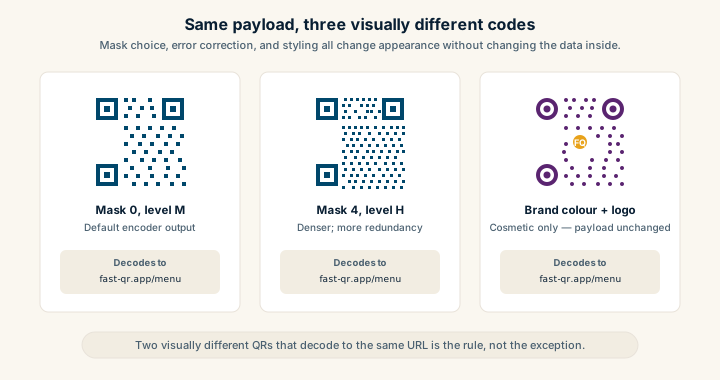
Re-encode the same URL with two different generators and you can end up with QRs that look visually different to a human eye but decode identically. Three things explain that:
- Masking patterns. The QR specification defines eight masks that get XORed onto the data area to break up long runs of same-color modules. The encoder picks whichever mask scores best on standardized scan-friendliness rules. A different mask choice produces a visually different code from the same payload.
- Error correction level. Bumping a code from level L (7% recovery) to level H (30% recovery) adds parity modules, which changes the visual density. Same data, denser-looking code.
- Cosmetic styling. Brand colors, rounded modules, embedded logos, frame badges, and custom finder shapes all change the appearance without touching the payload. A blue QR with a centered logo and a turquoise frame is the same code as a black-and-white version with the same URL inside.
This is why your designer’s mockup and your generator’s output can look different yet both work. It’s also why a “stylized” code with heavy gradients and uncommon module shapes can occasionally fail to scan — the visual changes confuse the scanner’s threshold detection even when the underlying data is intact. The QR code design best practices guide covers the styling choices that hold up versus the ones that look great and fail.
How to read any QR code’s payload
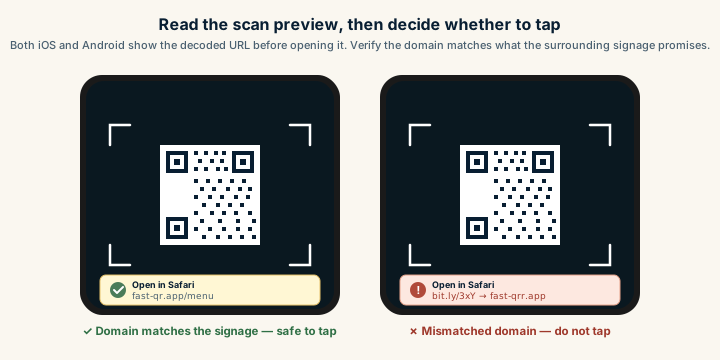
To see what is actually inside a QR code you found in the wild:
- Use your phone camera’s built-in preview. Both iOS (11+) and Android (10+) show the decoded URL or string in a banner before launching anything. Do not tap through — just read the preview.
- Use a decoder web tool. Sites like the ZXing online decoder accept an uploaded image and return the raw payload string.
- Use a command-line decoder.
zbarimgfrom thezbarpackage decodes QR codes from image files:zbarimg --quiet --raw code.pngprints the raw string.
This is the right safety habit before scanning unknown QRs. QR phishing attacks rely on users tapping through the decoded preview without reading what it says. If the destination domain does not match what the surrounding signage promises, do not tap. The are QR codes safe guide covers the threat model and prevention patterns.
Build any of these QR codes
Each generator route below produces a QR from the corresponding payload type, with no signup, no watermark, and no email. Pick the type that matches your example.
- URL → PNG and URL → SVG for websites, landing pages, menus, payment pages, and ticket check-in URLs.
- Wi-Fi → PNG for guest networks, lobby signage, and laminated table tents.
- Email → PNG for
mailto:actions with pre-filled subject and body. - Phone → PNG for
tel:tap-to-call. - SMS → PNG for pre-filled text-message lead capture.
- WhatsApp → PNG for
wa.mechat openers with prefilled context.
For the full catalog of deployment patterns by industry — restaurants, hotels, retail, healthcare, real estate, events — the /qr-code-for directory maps each scenario to a dedicated playbook.
Sources
- Wikipedia — QR code — Comprehensive technical reference covering payload formats, encoding modesHow a QR code packs its payload — numeric (most efficient for digits), alphanumeric (digits + uppercase + a few symbols), byte (8-bit, used for URLs and Unicode), or Kanji (Japanese characters in Shift JIS). Read more →, and visual structure.
- Denso Wave — Examples of QR Code use — Real-world QR deployments and payload examples documented by the inventor of the QR code.
- RFC 6350 — vCard format specification — IETF specification for vCard 3.0 contact payloads encoded inside business-card QR codes.
- ISO/IEC 18004:2015 — International standard that defines QR module geometry, masking patterns, and decoder behavior.
- EMVCo — QR Code Specifications for Payment Systems — Standardized merchant payload format used in PIX, UPI, PayNow, and other national payment QR systems.